Contrail

Every shot leaves a line.

Your real shot, traced across a real course. Contrail draws a broadcast-style tracer over a 3D satellite view of the hole, so you see how far it flew and exactly where it landed. Shot tracing works with Garmin Approach R10. No launch monitor? GPS mode measures each shot from your iPhone.
Coming soon to iPhoneiPhone · iOS 26 or later
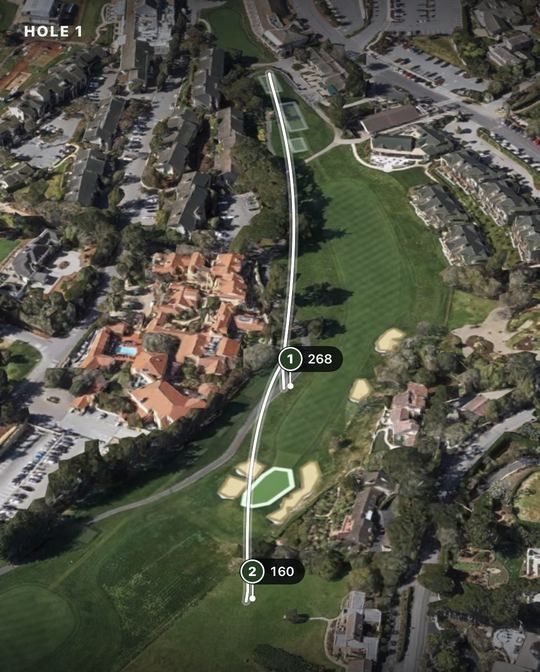
Two shots traced as white lines across a 3D satellite view of a golf hole, each marked with its distance in yards.

The moment

Hit. Watch it fly. See exactly where it landed.

Right after a real shot, Contrail draws a line of light across a 3D view of the hole. It rises, peaks and comes down where your ball did. The trace matches what you just watched happen.

  • Carry
  • Total
  • Ball speed
  • Curve
  • and more

Not a video tracer. Contrail computes the flight from your launch monitor’s data and draws it on the course.
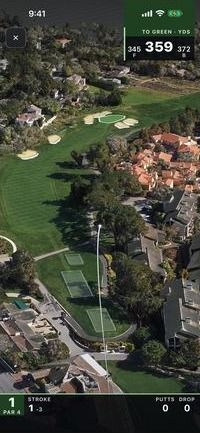
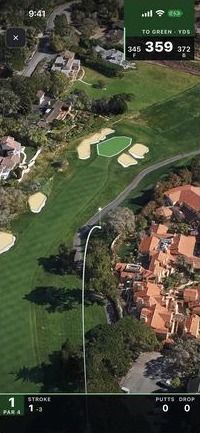
  1. Moments after the swing: a thin white tracer climbs over a satellite view of the hole.

    01 Rising

  2. The tracer arcs down over the fairway as the camera follows the ball toward the green.

    02 Descending

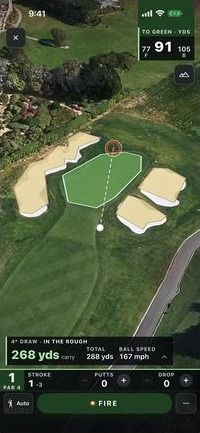
  3. The drive has come down in the rough short of the green, 91 yards to the center; a panel shows 268 yards carry, 288 total, 167 mph ball speed and a 4° draw.

    03 Landed

Shot tracer

Every shot, traced on a 3D hole.

With a launch monitor, each swing draws a broadcast-style tracer across a 3D satellite map of the hole, and the camera follows the ball through its flight. Then you see carry, total (with roll-out shown as an estimate), ball speed and curve.

  • Front, center and back of the green at a glance
  • A draggable aim line with a live yardage
  • A TV-style scorecard: hole, par, strokes, putts and penalties
Two shots traced across a 3D satellite view of a hole, marked 268 and 160 yards.

GPS mode

No launch monitor? No problem.

Hit, walk to your ball and tap At my ball. GPS measures how far it went, with an honest ± margin. In a cart, or can see your ball but can’t reach it? Mark it on the map.
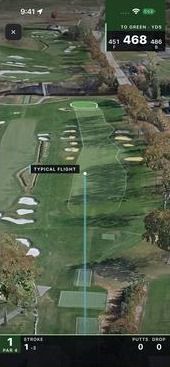
  • A club strip records your club. It never guesses silently.
  • A pale “Typical flight” arc shows an estimated carry, clearly labeled and never counted in your stats.
  • Missed a swing on your launch monitor? Mark that one shot by GPS and keep your round complete.
GPS mode: a pale line labeled Typical flight runs up the fairway from the tee, marking an estimated carry.

Lock Screen

Mark your shot without unlocking.

A Live Activity on the Lock Screen and in the Dynamic Island, a Mark control for Control Center, the Lock Screen or the Action Button, and Siri phrases. Mark a shot without opening the app, and your round stays complete.
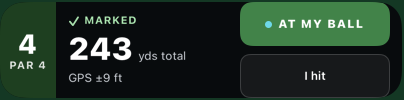
  • Undo is there for 8 seconds, just in case.
A Lock Screen Live Activity for hole 4, par 4, reading “Marked, 243 yds total, GPS ±9 ft”, with At my ball and I hit buttons.

Cinematic recap

Every hole gets its broadcast moment.

At the end of a hole, a 180° sweep circles the hole and replays each shot in turn, with numbered markers and the club and carry for each. Then comes the hole card. Birdie! Eagle! Replay it, share a picture of your traced hole, or play on.
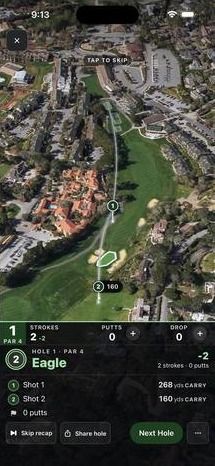
  • Quick and Off modes, with Quick used automatically when Reduce Motion is on.
The end-of-hole recap: an aerial view of the hole with two numbered shots, and a hole card reading “Eagle” that lists each shot’s carry.

Practice range

A range session worth studying.

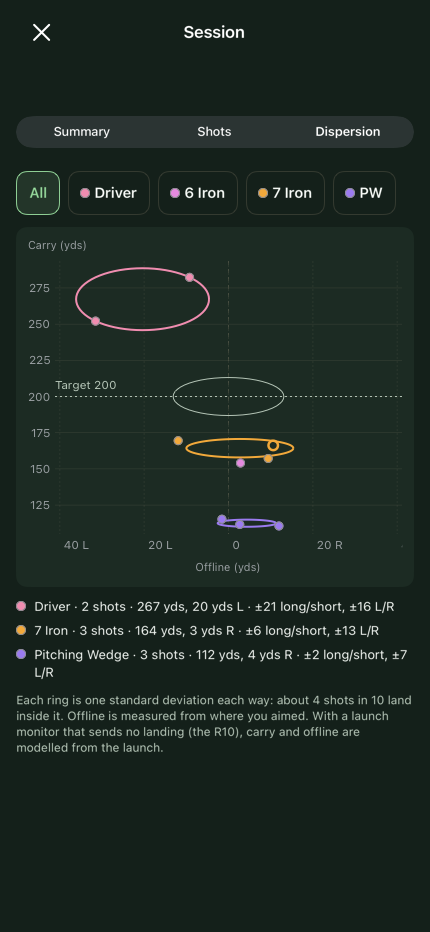
A premium simulator-style range with color-coded tracers for every club, spoken shot callouts, and session summaries with per-club dispersion charts.
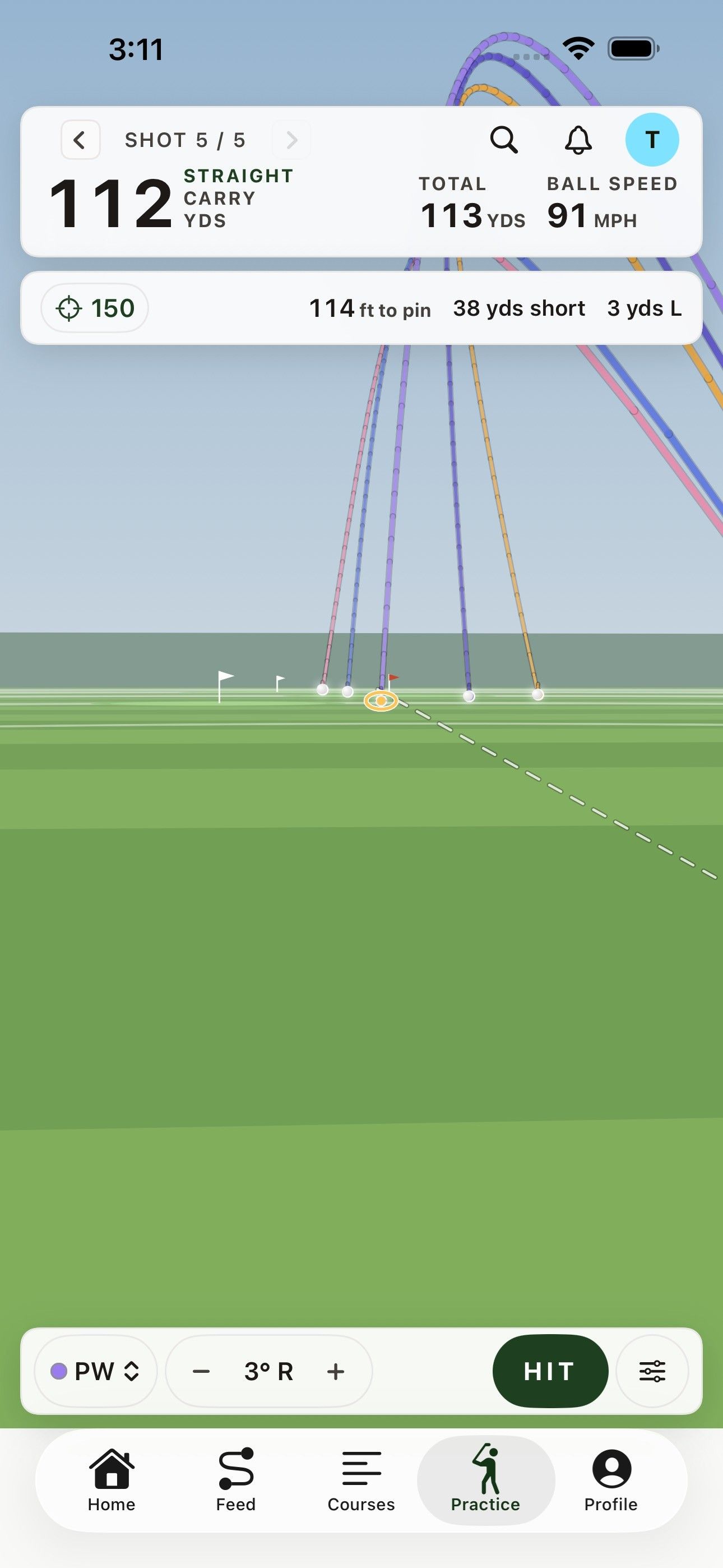
  • Range games: Closest to the Pin, Approach Challenge, Long Drive, Points Play and Skills Combine.
Contrail’s practice range with color-coded ball flights for each club, and the last shot’s carry, total and ball speed.
A session’s dispersion chart, with a ring for each club showing where its shots landed.

Clubhouse

Rounds worth sharing. Drives worth beating.

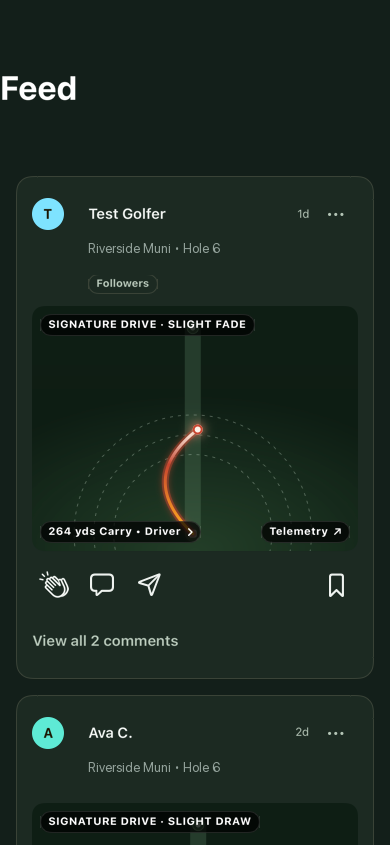
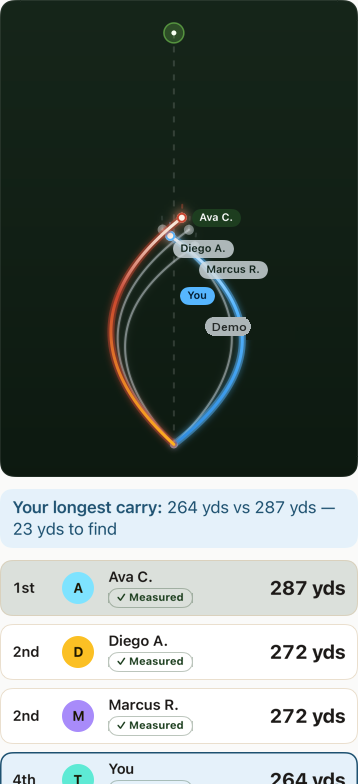
Share rounds to a feed with reactions and comments, follow other golfers, and chase “Beat my drive” leaderboards for each hole: longest carry, ball speed, closest to the pin and more.
  • Per-round privacy: Everyone, Followers or Private.
The Clubhouse feed: shared drives shown as glowing tracer cards with reactions and comments.
A “Beat my drive” leaderboard: several golfers’ drives traced on one chart, ranked by carry.

And the rest of your game.

  • Career stats

    Carry and consistency for every club, dispersion, trends and your full round history.

  • Your data, portable

    Export your shots as CSV, GeoJSON or GPX any time.

  • Courses

    A library of mapped 18-hole courses, with more imported as course files.

  • Phone in your pocket

    With a launch monitor connected, shots keep arriving even with your phone locked.

Built for real golfers

Bring a launch monitor, or nothing at all.

With a launch monitor

Works with Garmin Approach R10 over Bluetooth. Every shot your R10 reads is traced on the hole, with carry, total, ball speed and curve.

With just your iPhone

GPS mode needs no hardware. Contrail measures each shot from where you hit to where your ball stopped, and shows its margin.

Garmin and Approach are trademarks of Garmin Ltd. or its subsidiaries. Contrail is an independent app and is not affiliated with or endorsed by Garmin.

Privacy by default

Your shots are yours.

Contrail is built to measure your golf, not to watch you.

Read the Privacy Policy
  • No ads
  • No tracking across apps or websites
  • No analytics or crash-reporting SDKs
  • Location only during a round, never “Always”
  • Export your shots any time: CSV, GeoJSON or GPX
  • Delete your account right in the app

Questions

Good questions.

All answers on the Support page

When will it launch?

Contrail is coming soon to iPhone. We haven’t announced a date yet, so sign up for launch news and we’ll let you know when it’s available.

Do I need a launch monitor?

No. In GPS mode, you hit, walk to your ball and tap At my ball, and Contrail measures how far it went, with an honest ± margin. If you’re in a cart, or can see your ball but can’t reach it, you can use Mark on map instead.

How accurate is it?

In GPS mode, every measured distance shows its ± margin, so you can see how precise each reading is. With a launch monitor, carry is computed from the launch data it records, and roll-out is shown as an estimate. The pale “Typical flight” arc in GPS mode is clearly labeled as an estimate and never counted in your stats.

Is my location tracked all the time?

No. Contrail asks for location access “While Using” only, never “Always”, and uses it during a round to measure your shots. It keeps working while your phone is locked only while a round is in progress, and stops when the round ends. Read our Privacy Policy.

Be first on the tee.

Contrail is coming soon to iPhone. Leave your email and we’ll let you know when it’s ready.

Screens are from Contrail in development and may change. Satellite imagery in the app is provided by Apple Maps. Course data includes © OpenStreetMap contributors, available under the Open Database License.